Knowledge Cards
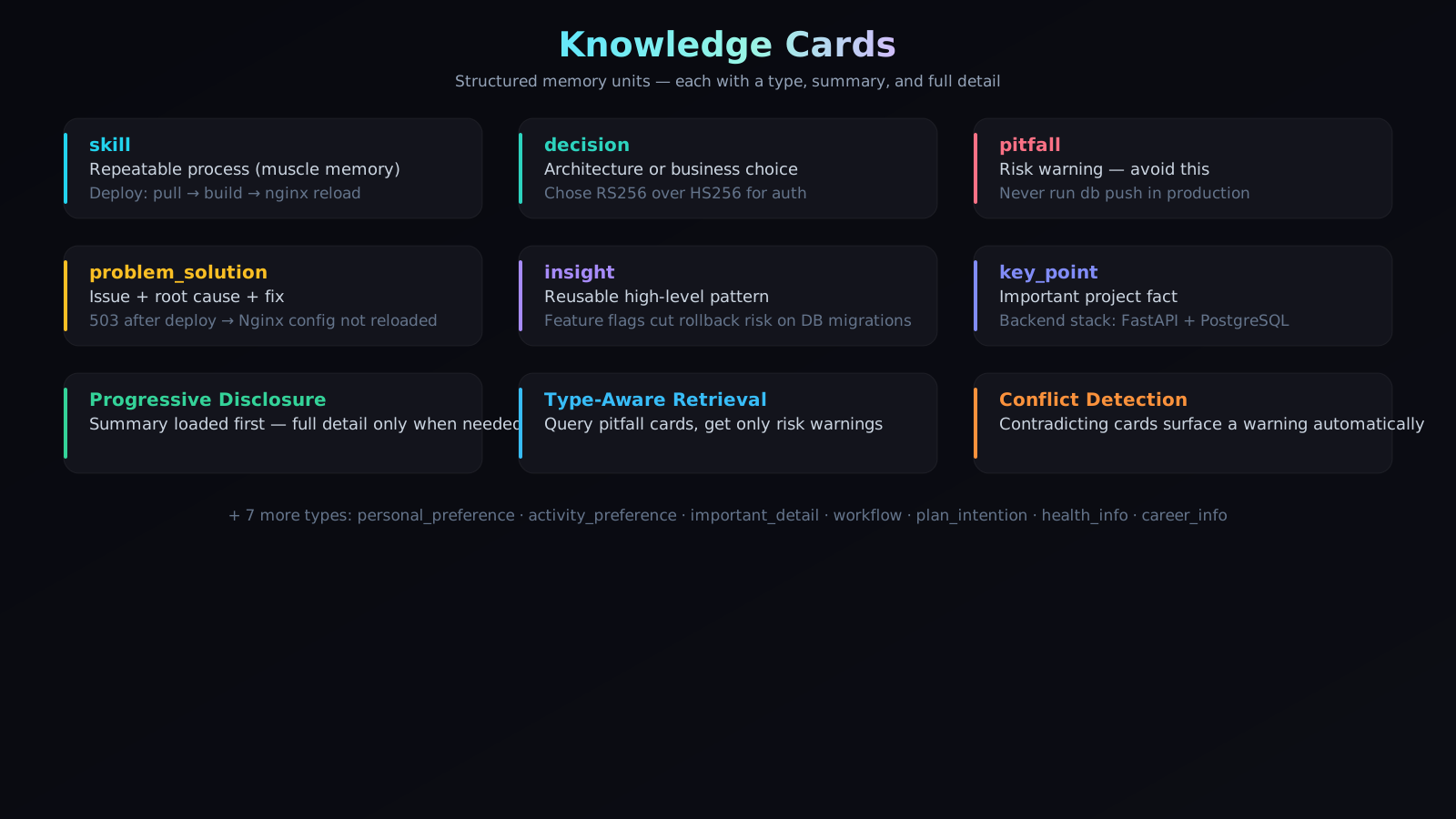
The building blocks of AI memory — not just storage, but structured understanding.
What Is a Knowledge Card?
When you talk with an AI assistant, a lot of valuable information passes through the conversation. A decision gets made. A bug gets solved. A process gets agreed on. And then — if nothing captures it — all of that is gone the next session.
A knowledge card is what Awareness creates to preserve those moments. It's a small, self-contained unit of memory that holds one piece of understanding: what it is, why it matters, and enough context to be useful later.
Compare these two ways of storing the same thing:
| Raw Storage | Knowledge Card |
|---|---|
| "We talked about auth and decided to use the token-based approach because the cookie approach had cross-domain issues. We tried session tokens first but they didn't work well." | Type: decision — Summary: "Auth uses token-based approach; cookies rejected due to cross-domain issues." — Full reasoning available on request. |
The knowledge card version is what gets handed to an AI when it needs to make a related decision. It's precise. It's typed. It's immediately actionable.
The 13 Card Types
Every knowledge card has a type — a label that tells Awareness what kind of understanding it holds. Thirteen types cover the full range of what a working AI system needs to remember:
| Type | What it captures | Example |
|---|---|---|
| skill | Repeatable step-by-step processes | "Deploy: pull → build → nginx reload" |
| decision | Architecture or product choices with rationale | "Auth uses RS256; HS256 rejected due to key rotation complexity" |
| problem_solution | Bugs diagnosed and resolved | "502 error after deploy = nginx config not reloaded" |
| pitfall | Known risks and things to avoid | "Never run db push in production — drops columns silently" |
| insight | High-level patterns worth repeating | "Feature flags reduce rollback risk on database migrations" |
| workflow | First-time process recordings | "How we set up the CI pipeline from scratch" |
| key_point | Important project facts | "Backend stack: FastAPI + PostgreSQL" |
| personal_preference | Individual or team coding habits | "Always use snake_case; TypeScript strict mode required" |
| activity_preference | Work-style and non-technical habits | "No major refactors on Fridays" |
| important_detail | Easy-to-miss but critical context | "API keys always use the prefix aw_" |
| plan_intention | Future directions and intentions | "Planning to migrate auth to OAuth2 next sprint" |
| health_info | Personal context for personalized assistance | "Prefers dark mode; sensitive to bright screens" |
| career_info | Professional background context | "Full-stack engineer, Python/Go primary" |
How AI Reads Knowledge Cards
When an AI agent needs context, Awareness doesn't hand it a wall of raw text. It uses a two-step approach called Progressive Disclosure:
Step 1: Summary Index
First, the AI receives a compact list — card type plus a one-line summary for each relevant card. This gives it a map of what's available.
[decision] Auth uses RS256; HS256 rejected due to key rotation complexity
[pitfall]  Never run db push in production — drops columns silently
[skill]    Deploy: pull → build → nginx reload
This costs almost no context budget. The AI can scan dozens of cards this way and decide which ones it actually needs to read in full.
Step 2: Full Detail On Demand
When the AI decides a card is relevant to its current task, it requests the full record — which includes the complete reasoning, linked events, version history, and any conflict notes.
This means the AI only pays attention to (and spends tokens on) what's actually useful right now.
How Knowledge Cards Improve Accuracy
Raw text retrieval gives you whatever text best matches your query — but it doesn't know what kind of answer you need. Knowledge cards change this.
Type-aware retrieval means:
- Asking "what should I watch out for?" retrieves
pitfallcards specifically — not general text that might or might not contain risks. - Asking "how do we deploy?" retrieves
skillcards — step-by-step processes — not just conversations that mention deployment. - When making an architecture choice, Awareness surfaces
decisioncards andinsightcards, not personal preferences or meeting notes.
The result: the AI gets the right kind of memory for the task at hand, which means fewer irrelevant results and more precise answers.
Conflict detection adds another accuracy layer: if a new decision contradicts a stored one, the AI is automatically notified rather than silently working from outdated context.
How Knowledge Cards Save Tokens
Without structure, giving an AI "what it needs to know" means dumping large amounts of text and hoping the relevant parts surface. Knowledge cards make this efficient in three ways:
1. Summaries First
The one-line summary of a card is typically 10–15 words. A full card detail might be 200–300 words. With Progressive Disclosure, the AI scans the summaries first and only loads full details for the 2–3 cards that are directly relevant. Instead of loading 2,000 words, it might load 200.
2. Type Filtering
Because cards are tagged by type, retrieval can be scoped. Looking for risks? Only load pitfall cards. Looking for how a process works? Only load skill and workflow cards. Irrelevant card types never enter the context at all.
3. No Redundancy
Duplicate detection during production means the same fact isn't stored (and retrieved) multiple times in slightly different forms. One canonical card per piece of knowledge.
The practical effect: an AI agent runs longer sessions with the same context budget, and the context it does use is dense with relevant signal rather than diluted with noise.
Version History and Conflict Resolution
Knowledge cards evolve. A decision made in January might be revisited in March. When that happens:
- The new card replaces the old one as the active version
- The old card is preserved with a
supersededstatus — still readable, but not returned in normal recall - Both cards are linked, so you can trace the full history of how a decision changed
- If the conflict was detected automatically, a note records what triggered the update
This means your AI always works from the current understanding of your project — but you never lose the trail of how you got there.
How Cards Are Created
Knowledge cards are created automatically from events — you don't manually write them.
When an event is recorded (a conversation, a tool result, a code review), Awareness analyzes it and extracts any knowledge worth preserving. If a clear card type is identified, the card is created, checked for conflicts, and saved.
You can also create cards manually through the API if you want to seed the memory with existing knowledge — documentation, past decisions, or team conventions.
→ See Memory Production for the full extraction pipeline.
→ See Core Concepts for how cards fit into the overall memory architecture.